








Cloud Application Development in 2026, Architecture, Cost and How to Build One

Saurav Jagdale
Technical Lead, Unico Connect
In this article
- Quick Answer
- Key Takeaways
- What Is Cloud Application Development
- Serverless vs Containers vs a Managed Platform
- How to Build a Cloud Application, Step by Step
- Who Secures What in a Cloud Application
- What Cloud Application Development Costs
- Moving an Existing App to the Cloud
- What to Ask a Cloud Application Development Company
- How Unico Connect Builds Cloud Applications
- Frequently Asked Questions
Cloud application development choices made in the first weeks shape the monthly bill, the on call load and how hard a later move will be. Every vendor price and limit below was read at its source on November 2, 2026.
Quick Answer
For most new web apps and APIs, build the cloud application on containers that scale to zero, use serverless functions for events and scheduled jobs, and hold off on Kubernetes until many services justify it. Pick the cloud your team, data and contracts already lean toward, and set up identity, infrastructure as code and CI/CD before the first feature. MVPs start at $15,000, inside our published estimate range of $15,000 to $50,000, and take 2 to 3 months on web or mobile. The cloud bill comes on top, and an EKS control plane, a NAT gateway and a public IPv4 address each bill every hour. The provider secures its data centers, while your data, identities and access rules stay yours.
Key Takeaways
- Cloud native describes how an app is built, not where it runs, and it needs neither Kubernetes nor microservices.
- A managed Kubernetes control plane on EKS in standard support costs $0.10 per cluster hour, about $73 a month before any node runs.
- Many existing apps can move to the cloud without a rewrite.
- Keep the cloud accounts, billing and infrastructure code in your company name.
What Is Cloud Application Development
Cloud application development is designing, building and running software on services rented from a cloud provider, so compute, databases, storage, sign in and deployment arrive as managed services, not hardware you buy. Agencies sell the same work as cloud app development or cloud based application development. The NIST definition of cloud computing, published in September 2011, names five essential characteristics. They are on demand self service, broad network access, resource pooling, rapid elasticity and measured service.
Cloud Native vs Cloud Enabled vs Lift and Shift
Cloud based only says where an app runs. Cloud native application development says how it was built. The CNCF cloud native definition, approved in February 2024, describes loosely coupled systems that typically use some combination of containers, service meshes, multitenancy, microservices, immutable infrastructure, serverless and declarative APIs, so a cloud native app need not be split into microservices.
Table 1. Three ways an app ends up in the cloud
| Approach | What it means | Fits when |
|---|---|---|
| Cloud native | Built for the cloud from the first commit, on managed services, containers or functions, with automated deployment | New products and apps that will change often |
| Cloud enabled | Built for a data center and later changed so it also could run in the cloud, as IBM describes it. An industry term with no standard definition | Stable apps that need cloud hosting more than a new architecture |
| Lift and shift | Moved to cloud servers without changes, which AWS calls rehosting | A data center exit with a deadline, as a first step |
Serverless vs Containers vs a Managed Platform
Start most new web apps and APIs on containers that scale to zero, and keep functions for events and scheduled jobs. Choose per workload, not per company, since one product can run both. Google Cloud Run scales a service to zero instances by default when no traffic arrives, and Azure Container Apps charges no usage at zero, so a container no longer means paying for idle servers. AWS Fargate also runs containers without servers to manage, but it bills from the image download until the task stops.
Table 2. Functions, containers, Kubernetes or a managed platform, read November 2, 2026
| Option | Best fit | Cost when idle | Work left for your team | Lock in |
|---|---|---|---|---|
| Serverless functions, such as AWS Lambda, Azure Functions and Cloud Run functions | Webhooks, events, scheduled jobs, spiky glue code | Close to zero, billed per request and duration | Low, but Lambda stops a standard function at 15 minutes | High, triggers and permissions differ per provider |
| Serverless containers, such as Google Cloud Run, Azure Container Apps and AWS Fargate | Most new web apps, APIs and workers | Zero on Cloud Run and Container Apps, while Fargate bills for running tasks | Low to medium, you own the image and its packages | Low, a standard image moves between clouds |
| Managed Kubernetes, such as Amazon EKS, Google GKE and Azure AKS | Many services, steady traffic, a platform team | A control plane fee on most tiers plus nodes or pods, even with no traffic | High, upgrades, node pools, networking and policies | Medium, the API is portable but add ons are not |
| Managed app platform, such as Google App Engine, Azure App Service and AWS Elastic Beanstalk | A small team shipping a standard web app fast | App Engine standard scales to zero. Paid App Service plans and Elastic Beanstalk instances bill even when idle | Lowest, within platform limits | Medium, build and config rules differ per platform |
The lock in column is our judgment from builds on all three clouds. We containerize with Docker by default, because keeping every environment consistent is good practice. We add Kubernetes when the workload earns it (many services, real traffic, and a need for automatic scaling and resilience), and we lean on managed Kubernetes so clients are not running control planes by hand. Code structure follows the same logic. We default to a modular monolith for new products and move to microservices only when team size and scaling justify it, splitting incrementally along boundaries designed in from the start.
When a Virtual Machine Still Wins
A plain virtual machine still wins for licensed software that expects a fixed server, stateful work that cannot restart at will, and heavy load that never drops. Steady load is also why teams leave functions, because per request billing stops being cheap.
How to Build a Cloud Application, Step by Step
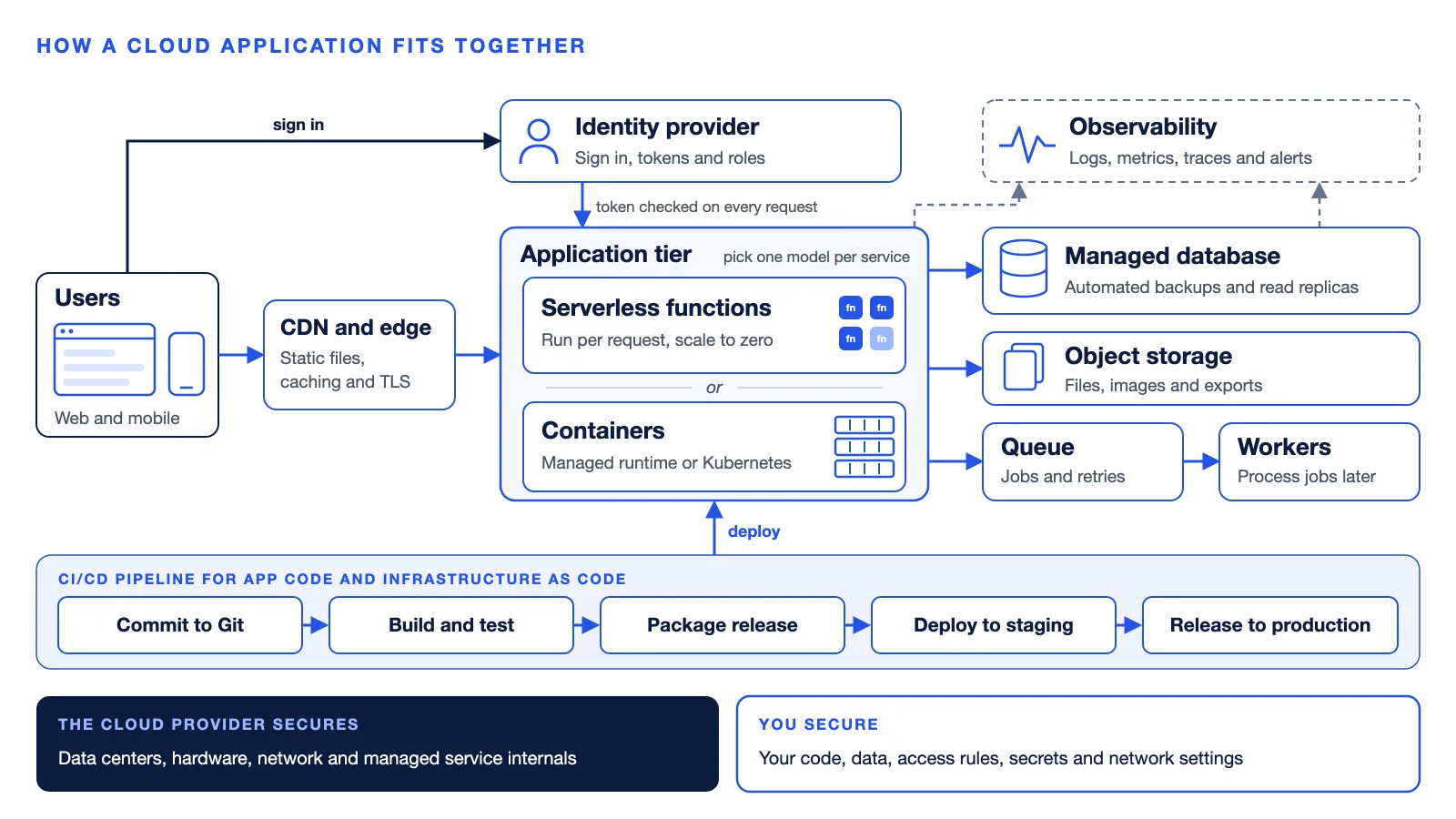
To develop a cloud application, work through the eight steps below. It is tempting to leave security and CI/CD until the end of the cloud application development process. Put accounts, identity, infrastructure as code and the pipeline first instead, because bolting them onto a working app means rework. Feature work runs alongside steps 6 to 8 and ships in small releases.
Write down the workload
List the users, traffic shape, data, compliance rules, uptime target and monthly budget. Output is a one page brief every later choice is checked against.
Pick the cloud and the compute model
Start where your team, data and contracts already lean, and read our AWS, Azure and Google Cloud comparison if nothing does. Pick on your constraints, not on any partner badge, ours included. Then choose a compute model per workload from Table 2 and run a Well-Architected review, which AWS calls a constructive conversation about architectural decisions, not an audit. Output is a short architecture decision record.
Set up accounts and identity
Open the cloud accounts in your company name, give the team single sign on and least privilege roles, and send app sign in to a managed service such as Amazon Cognito, Google Identity Platform or Microsoft Entra External ID. Output is an account structure, team roles and a working identity provider.
Write the infrastructure as code
Define networks, databases, queues and services in Terraform or the provider tool, and create development, staging and production from the same code. Keep config in the environment, as the Twelve-Factor App advises, and secrets in a secret manager, never in the repository. Output is an infrastructure repository that can rebuild any environment.
Build the CI/CD pipeline
Every merge builds, tests and scans the code, then deploys to staging. Production releases use the same pipeline with a one step rollback. Output is a path to production nobody can bypass from a laptop.
Lay down the data layer
Use a managed database with automated backups, object storage for files, and a queue for slow work that background workers drain. Output is schema migrations in the pipeline and one restore you have actually tested.
Add observability before launch
Send logs, metrics and traces to one place, alert on what users feel, such as error rate and latency, and write a runbook for each alert. For Spectron, a smart metering technology provider, we built the cloud native backend, with redundancy at the ingestion and database layers, alerting that catches anomalies before they cascade, and runbooks that make on call response repeatable. The platform monitors 1,500+ meters at 99.9 percent uptime. Output is dashboards, alert routes and runbooks.
Review security, load test, then launch
Walk the shared responsibility split below, load test at the expected peak and set budget alerts. Output is a signed launch checklist.
Who Secures What in a Cloud Application
The provider always secures its data centers, hardware and physical network, and you always own your data, user identities, accounts and access rules. The layers in between move toward the provider on managed platforms. Microsoft lays the split out as a matrix that counts Azure Functions as a platform service, and AWS and Google Cloud draw the same outer lines.
Table 3. The shared responsibility model for a cloud application
| Layer | On virtual machines | On managed platforms and functions |
|---|---|---|
| Data centers, hosts and physical network | Provider | Provider |
| Operating system and its patches | You | Provider |
| Network controls such as firewall rules | You | Shared |
| The application layer | You | Shared |
| Data, identities, accounts, settings and access rules | You | You |
Managed Kubernetes sits between the two columns. AWS says it takes on more as you move from self managed worker nodes to managed node groups to Fargate, and teams on managed node groups still upgrade their own node images. Serverless containers sit in between as well. The provider patches the hosts, while the base image and the packages inside a container you build stay yours to patch.
A provider certification covers the provider layer and stops there. AWS lists physical and environmental controls as an example of controls you fully inherit, while configuring your guest operating systems, databases and applications stays with you.
What Cloud Application Development Costs
Cloud app development cost has two parts, the build and the monthly bill. A web app MVP runs $15,000 to $50,000, a mid sized platform $50,000 to $150,000, and an enterprise system $150,000 and up.
Table 4. Build cost and timeline by tier, Unico Connect estimate ranges
| Tier | Unico Connect estimate range | Timeline | Scope |
|---|---|---|---|
| Web app MVP | $15,000 to $50,000 | 2 to 3 months | Core workflows, auth, dashboard, one user role |
| Mid sized platform | $50,000 to $150,000 | 3 to 6 months | Multi role SaaS, integrations, reporting, payments |
| Enterprise system | From $150,000 | 8 to 18 months | Legacy integration, compliance, high availability, large data |
$15,000 covers a single platform MVP with one core flow. Payments, integrations or a second platform move it toward $30,000 to $50,000. Maintenance runs 15 to 25% of the build cost per year, covering dependencies, security patches and small fixes (Keyhole).
The Monthly Bill Starts Before Launch
Always on resources bill from the day they are created, staging included. Three of the seven lines below bill every hour, traffic or not.
Table 5. Running cost lines to price before you build, list prices read November 2, 2026
| Cost line | List price | What it means |
|---|---|---|
| Functions, AWS Lambda in US East | 1 million requests and 400,000 GB seconds free a month, then $0.20 per million requests and $0.0000166667 per GB second on x86 | Nothing at idle |
| Serverless containers, Google Cloud Run request based billing | 2 million requests, 180,000 vCPU seconds and 360,000 GiB seconds free a month, valued at Tier 1 prices | Nothing at idle unless you keep minimum instances |
| Managed Kubernetes control plane | $0.10 per cluster hour in standard support on EKS and GKE, $73 per cluster per month on the AKS Standard tier | About $73 a month per cluster before any node. The GKE free tier covers the fee for one Autopilot or zonal Standard cluster per billing account |
| NAT gateway, AWS US East (Ohio) | $0.045 an hour plus $0.045 per GB processed | About $33 a month per gateway before traffic |
| Public IPv4 address, AWS | $0.005 an hour, in use or idle | About $3.65 a month per address |
| Data out to the internet, AWS US East (N. Virginia) | First 100 GB a month free across AWS, then $0.09 per GB up to 10 TB | 1,000 GB out in a month costs about $81 |
| User sign in | Amazon Cognito Lite or Essentials free to 10,000 monthly active users on direct and social sign in, Google Identity Platform free to 50,000 on email and social sign in, with phone sign in billed per text message | Price the step past the free tier |
A standard x86 Lambda function serving 5 million requests a month at 512 MB and 200 milliseconds each costs about $2.47 after the free tier, if no other function uses it. One EKS cluster in standard support with a NAT gateway and two public IPv4 addresses costs about $113 a month in US East (Ohio) before it runs a single node, counting a 730 hour month. After launch, our guide to tuning a cloud bill covers right sizing and commitments.
Traps that inflate a cloud bill
- Idle clusters and gateways. Decide at design time whether staging needs its own cluster or can run on a runtime that scales to zero.
- Lock in through proprietary services. Provider specific queues, triggers and databases are fast to adopt and slow to leave. Keep data in a standard engine such as Postgres and wrap provider SDKs behind your own interfaces.
- Retiring plans. Linux hosting on the legacy Azure Functions Consumption plan retires on September 30, 2028, so start new apps on Flex Consumption.
Moving an Existing App to the Cloud
Many existing apps can move without a rewrite. AWS migration guidance lists seven strategies, and three matter for an app you keep. Rehost, or lift and shift, moves it without changes. Replatform adds some optimization on the way, such as a managed database. Refactor changes the architecture to use cloud native features. AWS does not recommend refactoring during large migrations, because it means modernizing the app mid move, and suggests rehosting or replatforming first.
Rehosting alone moves the servers but keeps the old cost shape and release habits, so plan the modernization step before the move. If the code itself is the problem, decide whether to refactor or rebuild it first.
What to Ask a Cloud Application Development Company
Good cloud application development services end with an app your team could keep running if the vendor left next month. Beyond the general partner questions, get these in writing.
- The cloud accounts, billing and admin access sit in your company name from day one, and the partner works through roles you can revoke.
- Every environment is infrastructure as code in your repository, so another team could rebuild it.
- A monthly running cost estimate for each environment arrives before the build, and budget alerts once it starts.
- An architecture decision record explains each managed service, its cost and what leaving it would take.
- A written responsibility split names who patches, who rotates secrets and who answers alerts after launch.
- A backup restore and a rollback are both rehearsed before launch.
- The exit terms cover handover of code, infrastructure code, runbooks and credentials.
How Unico Connect Builds Cloud Applications
Unico Connect takes on custom cloud application development for product teams, from the architecture decision record through infrastructure as code, CI/CD and observability, as part of our cloud and DevOps services. Full source code, infrastructure, and documentation are handed over under the engagement contract, and everything runs in accounts you control. We are a Google Cloud partner with Google Cloud certified engineers, and we have delivered projects on AWS, Azure and GCP.
Frequently Asked Questions
What does cloud application development mean?
Cloud application development is designing, building and running software on services rented from a cloud provider, so compute, databases, storage, sign in and deployment arrive as managed services, not hardware you buy.
What is the difference between a cloud native and a cloud enabled application?
A cloud native application is built for the cloud from the start, on managed services, containers or functions with automated deployment. A cloud enabled application was built for a data center and later changed so it also could run in the cloud. Cloud based covers both, since it only says where an app runs.
Should a new app use serverless functions or containers?
Use containers for most new web apps and APIs, on a runtime that scales to zero such as Google Cloud Run or Azure Container Apps. Use functions for events, webhooks and scheduled jobs that finish quickly, because AWS Lambda stops a standard function at 15 minutes. On AWS, Fargate runs containers without servers to manage but bills while tasks run.
Who is responsible for security in a cloud application?
Security is shared. The cloud provider always secures its data centers, hardware and physical network, and you always own your data, user identities, accounts and access rules. On virtual machines you also patch the operating system. On managed platforms and functions the provider patches it, except the base image inside a container you build.
How much does it cost to build a cloud application?
A web app MVP runs $15,000 to $50,000, a mid sized platform $50,000 to $150,000, and an enterprise system $150,000 and up. Those are published Unico Connect estimates, and the monthly cloud bill comes on top. At list prices read November 2, 2026, idle functions cost close to nothing, while an Amazon EKS cluster in standard support with a NAT gateway and two public IPv4 addresses costs about $113 a month in US East (Ohio) before it runs a single node.
How long does it take to build a cloud application?
An MVP with core workflows takes 2 to 3 months, a mid sized platform 3 to 6 months depending on complexity and workflows, and enterprise systems 8 to 18 months. Multi region failover, compliance controls and data migration from an old system push a cloud build toward the top of its range.