









Building Internal Tools Without an Engineering Team

Malay Parekh
CEO & Director, Unico Connect
In this article
- Quick Answer
- Key Takeaways
- What Counts as an Internal Tool
- The Four Things Teams Actually Build
- Where the No-Code Ceiling Actually Is
- Building an Internal CRM Without Coding
- Setting Up a Data Platform Without a Data Engineering Team
- The Pricing Shapes, and Where They Cross Over
- The Governance Features Are Behind the Expensive Door
- The Governance Problem Nobody Budgets For
- When to Bring Engineers In
- Frequently Asked Questions
- Conclusion
The interesting number about internal tools is how many get built without anyone in IT knowing.
In the Retool 2026 build versus buy report, a survey of 817 builders run in late 2025, 60 percent said they had created tools outside IT oversight in the past year and 25 percent said they do it frequently. The reasons they gave were speed at 31 percent, unmet needs at 25 percent and slow IT processes at 18 percent. The same survey found 35 percent of teams had already replaced at least one SaaS product with something they built, and 78 percent planned to build more in 2026.
This is a vendor surveying its own customers, so the absolute numbers skew toward people who already build, but the direction is what matters. Building internal tools without engineers is no longer the exception, and when it goes wrong the cause is almost never the technology.
Quick Answer
Most teams can build internal CRMs, admin panels, ops dashboards and workflow automation without an engineering team, using no-code platforms that handle the database, the interface and the deployment. What sets the ceiling is consequence rather than feature complexity. Once a tool becomes a system of record, holds regulated data, needs a real audit trail or has customers logging into it, a mistake costs more than building it properly would, and that is when to bring engineers in. The commonest failure is forty undocumented tools that nobody owns. A tool that cannot scale is a rarer problem. Decide ownership and data access before you pick the platform. Unico Connect builds and takes over internal tooling on exactly this boundary, using no-code platforms where they fit and custom backends where they do not.
Key Takeaways
- Governance fails before the technology does, so count the tools you already have before building more. In the Retool survey, 60 percent of builders had shipped tools outside IT oversight in the past year.
- Judge each tool by what breaks when it is wrong. A complicated tool nobody depends on is safe, and a simple one that decides who gets paid is not.
- Price the full rollout before you run the pilot. Per seat pricing is where the hidden cost sits, and at $50 per builder and $15 per internal user per month, Retool Business turns a 200 person rollout into an annual line item.
- Audit logs are a paid tier feature. On Retool they start at Business and SSO starts at Enterprise, so budget for the tier you will need once the tool matters.
- Name a maintenance owner before you build, or the tool becomes shadow IT on the day its builder changes role.
What Counts as an Internal Tool
An internal tool is software your own staff use to run the business, which never touches a customer. The definition sets the security and reliability bar. Internal tools usually sit behind a login you already control, serve tens or hundreds of users rather than millions, and can ride out a short outage without anyone outside the company noticing.
Those traits are why no-code platforms fit internal tools so well, and also why the same platforms get oversold for customer facing products. Once a tool stops being internal, none of those assumptions hold.
The Four Things Teams Actually Build
Four categories cover most of the internal tooling work we see.
- Admin panels. A screen over an existing database so support or operations can read and fix records without asking an engineer. Of everything on this list, these give the highest return and carry the lowest risk.
- Internal CRMs. Pipeline, contacts, activity history and reminders shaped around the way your team sells, instead of the way a SaaS vendor thinks you should.
- Ops dashboards. Numbers from a few systems in one place, refreshed on a schedule. Our business intelligence dashboards work usually starts here.
- Workflow automation. Approvals, notifications, document generation and scheduled jobs that replace a spreadsheet and a recurring meeting.
Where the No-Code Ceiling Actually Is
Where the no-code ceiling sits for each kind of internal tool
| Tool | Build it without engineers | Bring engineers in when |
|---|---|---|
| Internal CRM | Pipeline, contacts, notes, reminders, simple reporting for one team | It becomes the system of record for revenue, or it has to sync two ways with finance |
| Admin panel | Read, search and edit records in an existing database behind a login | Writes need transactions, approval chains or an audit trail that survives a dispute |
| Ops dashboard | Metrics from one or two sources refreshed on a schedule | Numbers start driving external commitments, or freshness is measured in seconds |
| Workflow automation | Linear handoffs, notifications, scheduled jobs, document generation | A failed step costs real money and needs retries, idempotency and alerting |
| Customer portal | A prototype or a pilot for a handful of named accounts | Real customers log in, which makes it a product with a security surface |
| Data platform | Consolidating a few sources for reporting a business team owns | Data feeds billing, regulators or models, where lineage and correctness are the product |
Building an Internal CRM Without Coding
An internal CRM is the most common first build, and the one most likely to outgrow its platform. The sequence that works is unglamorous.
- Model the data before you touch a tool. Contacts, companies, deals and activities, with one decision made explicitly, which is what a duplicate means in your business.
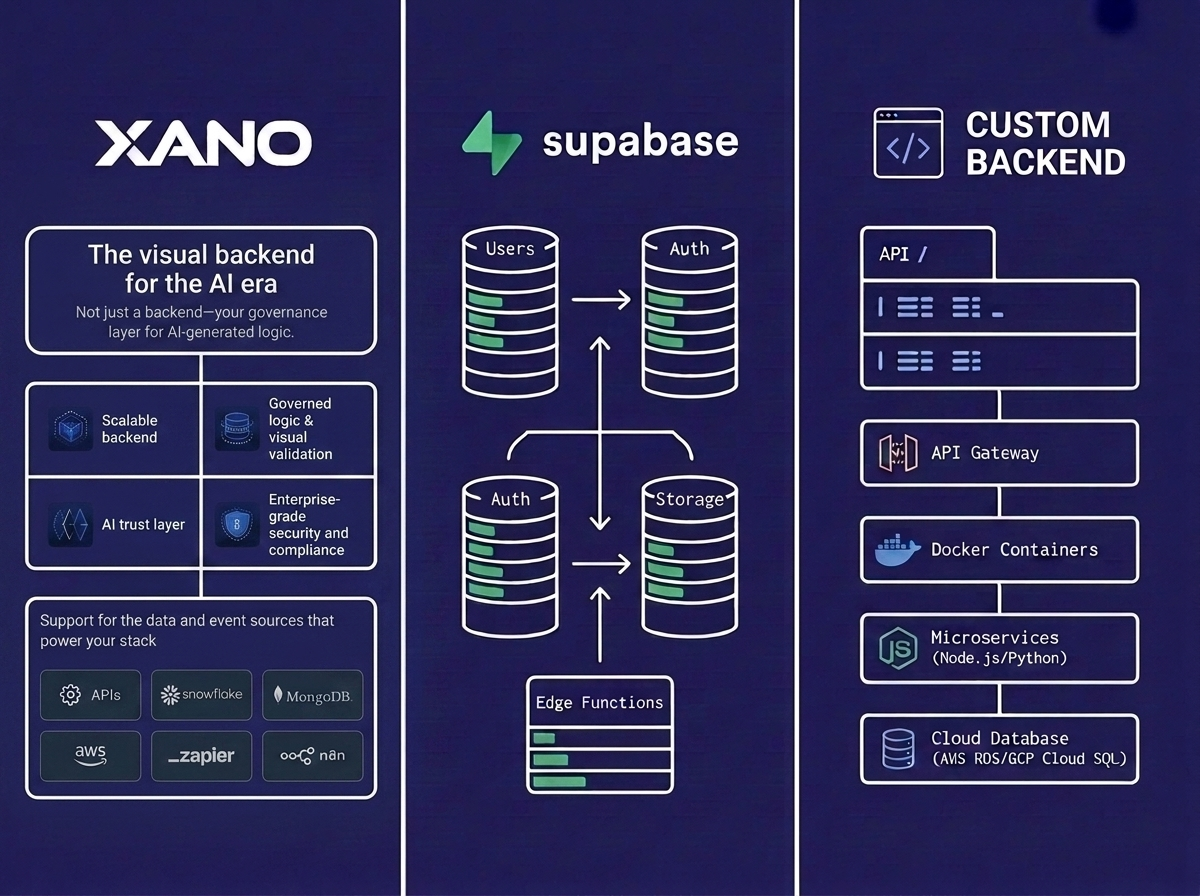
- Pick where the data lives first and the interface second. A no-code database such as Xano or a hosted Postgres such as Supabase keeps your records portable. A tool that owns both the data and the screens does not.
- Build read before you build write. Get the views right while the cost of changing your mind is zero.
- Add exactly one automation. Usually a reminder or a stage change notification. Hold off on the rest until people are using it.
- Decide the sync boundary. One way into finance is a report. Two way is an integration project, and that is where CRMs stop being weekend builds.
Our step by step guide to building a custom CRM with no-code tools covers the mechanics, and the step that needs judgement is step 5.
Setting Up a Data Platform Without a Data Engineering Team
A business team can own reporting, as long as the scope stays at reporting. Pull a few sources on a schedule, land them somewhere queryable, build views on top and accept that the numbers are only as fresh as the last run.
Data that feeds billing, regulatory reporting or a model in production is different, and a business team should not own it without engineering support. The tooling can do the job, but those uses need lineage, reconciliation and a defined answer to which number is correct when two systems disagree, and that is data engineering work in any tool.
The Pricing Shapes, and Where They Cross Over
Most comparisons skip pricing shape, yet it decides more budgets than the feature list does. Internal tool platforms price in three different shapes, and each one goes wrong in a different direction. We read every figure below from the vendor pricing pages on 15 September 2026.
Per seat. Retool is free to start, then Team at $10 per builder and $5 per internal user per month, then Business at $50 per builder and $15 per internal user, with Enterprise on custom pricing. Appsmith is free for up to five cloud users, then Business at $15 per user per month up to 99 users, then Enterprise listed at $2,500 per month for 100 users.
Hybrid, a platform fee plus seats. Budibase cloud runs Pro at $19 per month, Premium at $49, and Business at $299, with end users added at $5 per user per month and creators at $50 per creator.
Per instance. Xano publishes Essential at $85 per month and Pro at $224 per month, both billed annually, with HIPAA as a $500 per month add on on Pro and a 99.99 percent service level agreement on that tier. Adding users does not change the price.
Run one realistic scenario through all four and the shapes pull apart sharply. Take five builders and 200 internal users, an ordinary mid sized rollout.
| Platform | List price arithmetic | Monthly |
|---|---|---|
| Retool Business | 5 builders at $50 plus 200 users at $15 | $3,250 |
| Appsmith Business | Cannot serve this. The tier caps at 99 users | n/a |
| Appsmith Enterprise | Listed at $2,500 for 100 users, more above that | $2,500+ |
| Budibase Business cloud | $299 platform, plus 200 end users at $5, plus 5 creators at $50 | $1,549 |
| Xano Pro | Flat, billed annually, users do not change it | $224 |
| Budibase Open Source, self hosted | Free indefinitely, unlimited users, plus your own infrastructure and operations time | $0 plus ops |
The table compares cost curves and is not a ranking. These products do different jobs, and Xano is a backend where the others are interface builders, so the features behind each row are not like for like. What the table does show is the shape. Per seat pricing is cheapest to pilot and most expensive to roll out, and the crossover arrives far earlier than teams expect. Model the headcount you expect in year two instead of the pilot headcount.
The Governance Features Are Behind the Expensive Door
One pattern catches people out, and it held on every platform we checked.
The controls you need once a tool becomes important are gated behind the tier you buy last. On Retool, audit logging and rich permission controls begin at Business, and SAML or OpenID Connect single sign on and source control begin at Enterprise. On Appsmith, audit logs and custom roles begin at Business, while advanced single sign on through SAML, OIDC, Okta, Auth0 or Active Directory is Enterprise only, with the free tier limited to Google sign in. On Budibase, enforced single sign on arrives at Business and audit logs at Enterprise.
The teams most likely to run ungoverned tools are therefore the teams on the cheap tiers, and the fix is a line item nobody budgeted for. It is better to learn that before the first build than during the first audit. It is also the strongest argument for keeping the data somewhere you control. Moving interfaces between tiers or platforms is a week of work, while moving five years of unmodelled records is a project of its own.
There is one escape hatch. Appsmith and Budibase both publish free, open source, self hosted editions, and Budibase states that its open source plan is free indefinitely with unlimited users. Self hosting swaps a licence cost for an operations cost, which is a reasonable trade if you already run infrastructure and a bad one if you do not.
The Governance Problem Nobody Budgets For
Every organisation whose internal tooling we have helped untangle had the same shape of problem, and in none of them was the technology at fault.
- Nobody owns the tool. The person who built it moved teams, and it still runs payroll adjacent work.
- Nobody knows how many tools there are, because they accumulate one useful afternoon at a time.
- Permissions were never modelled, so everyone who can open the tool can see everything in it. That was the fastest way to launch.
- There is no audit trail, because audit logging was on a tier nobody bought.
- The data has quietly become the real asset. You can migrate the interface in a week, but not five years of records nobody modelled.
Four rules prevent almost all of this, and they cost nothing.
- Every tool has a named maintenance owner, recorded somewhere that is not the tool.
- Register the tool before it is used by a second person. A shared list is enough.
- Model permissions on day one, even if the answer is that everyone sees everything, so the decision is deliberate.
- Keep the data in a system you could point a different interface at. That single choice converts a rebuild into a reskin.
When Unico Connect takes over internal tooling, the first artefact we produce, ahead of any architecture diagram, is an inventory with an owner name against every tool, because you cannot make decisions about a system you cannot enumerate.
When to Bring Engineers In
The trigger is a tool becoming consequential, whether or not it has become complicated. Any one of these five signals is enough.
- It became a system of record. Something important now exists only here.
- A failed step costs money. You need retries, idempotency and alerting, which is engineering whatever the interface looks like.
- Someone external logs in. At that point it is a product with a security surface.
- A regulator or an auditor could ask. Audit trails and access controls become requirements.
- The workaround list is longer than the feature list. That usually means the tool has outgrown its platform.
Once one of these signals shows up, the choice is still rarely a rebuild from scratch. More often you keep the interface and move the data and the critical paths onto something durable, which is the same rebuild versus refactor decision you would make for any inherited system.
Frequently Asked Questions
What are the advantages of building internal tools with no-code platforms?
The main advantages are speed and ownership. A team that understands the process builds the tool directly, which removes the translation step that makes internal software slow to get right. The database, interface and hosting come as one package, so there is no deployment project. The advantage holds while the tool stays internal and low consequence, and shrinks quickly once it becomes a system of record.
Can you build an internal CRM without coding?
Yes, and it is one of the strongest use cases. Model your data first, keep it on a platform you could point another interface at, build read only views before you build editing, and add automations one at a time. It stops being a no-code job once it needs two way synchronisation with finance or billing systems.
How do you set up a CRM or data platform without a data engineering team?
For reporting, a business team can own it by pulling a few sources on a schedule into something queryable and building views on top. Once the data feeds billing, regulatory reporting or a production model, you need lineage and reconciliation, and that is data engineering work no matter which tool it is done in.
What are the risks of no-code internal tools?
The biggest risks are governance risks, and the technology itself is rarely the problem. In the Retool 2026 survey, 60 percent of builders had created tools outside IT oversight in the past year. The typical result is a sprawl of undocumented tools with no named owner, no permission model and no audit log, the last of which is often because audit logging sits on a tier the team did not buy. Each of those gaps costs nothing to prevent if you settle it before the build.
How much do internal tool platforms cost?
At list prices read in September 2026, five builders and 200 internal users cost near $3,250 per month on Retool Business, near $1,549 on Budibase Business cloud, from $2,500 on Appsmith Enterprise and $224 on Xano Pro, which charges per instance rather than per seat. That spread depends entirely on the pricing shape and not on the sticker price. Budibase and Appsmith both offer free self hosted open source editions, which trade licence cost for operations cost.
Which internal tool platform is cheapest at scale?
Per instance pricing wins at scale and per seat pricing wins at pilot size, so the answer depends on headcount more than on the product. A free self hosted open source edition is the cheapest on licence, but it is not free in total, because you take on the hosting, upgrades and security patching yourself. Model year two headcount before choosing.
Which no-code platforms deploy a real web app?
Several do, and they differ in what they own. Interface first platforms such as Retool, Appsmith and Budibase put a screen over data you already have. Backend first platforms such as Xano give you the database and APIs and let you attach any front end. Hosted Postgres such as Supabase sits closest to conventional engineering. Our top no-code tools guide compares the current field.
When should an internal tool be rebuilt by engineers?
When it becomes a system of record, when a failed step costs money, when someone outside the company logs in, when an auditor could ask about it, or when the workarounds outnumber the features. Even then, the usual answer is to move the data and the critical paths and keep the rest.
Do AI coding tools change this decision?
They change who can produce a first version, and they do nothing to settle who should own a consequential system. The Retool survey found 75 percent of respondents working under AI directives while 35 percent of organisations had established no AI productivity metrics at all, and 72 percent remained at basic or intermediate automation maturity. If building gets faster while ownership stays vague, you end up with more shadow IT.
Conclusion
For admin panels, internal CRMs, ops dashboards and workflow automation, building without an engineering team is a good idea. The boundary is consequence rather than complexity, and when something does go wrong the platform is almost never the cause. Two decisions carry most of the outcome. Choose the pricing shape for the headcount you expect in year two, and remember that the governance controls you will eventually need sit on the tier you were planning to avoid. Name an owner, register the tool, model permissions on day one and keep the data portable, and most of the failure modes disappear before they start. If you have internal tooling that has outgrown where it was built, or you want it built on the right side of that boundary the first time, see our no-code development services or talk to our team.