










Hostinger or GoDaddy Email to Google Workspace in India, the Steps in Order

Saurav Jagdale
Technical Lead, Unico Connect
In this article
- Quick Answer
- Key Takeaways
- Which GoDaddy or Hostinger Email Product You Have
- Hostinger or GoDaddy Email to Google Workspace, the Move in Order
- What Moves and What You Recreate by Hand
- GoDaddy Email to Google Workspace, Records and Billing
- Hostinger Email to Google Workspace, Records and Billing
- How Long Mail Is at Risk During the MX Switch
- Four Mistakes That Lose Mail
- Doing the Move with Unico Connect
- Frequently Asked Questions
Moving Hostinger or GoDaddy email to Google Workspace is a copy job followed by one DNS change, and mail goes missing when the two happen in the wrong order. If you are still choosing a provider, read our guide to business email in India first.
Quick Answer
To move Hostinger or GoDaddy email to Google Workspace, list every mailbox, alias and forwarder, sign up, verify the domain and create every user while the MX records still point to the old host. Copy the old mail with the Google data import tool over IMAP. Then replace the old MX records with one record, smtp.google.com, set up SPF, DKIM and DMARC, run a last import for late mail, test, and only then cancel the old email plan.
Key Takeaways
- Create every user in Google and copy the old mail before the MX records change.
- The Google import copies mail and folders only. Contacts and calendars move as files, and aliases, forwarders, signatures and filters are set up again.
- Google allows up to 72 hours for a new MX record to be recognised, so keep the old email plan active until the last import has run.
- The domain and web hosting are separate from email and can stay. Cancel only the email subscription, and only after the last import.
Which GoDaddy or Hostinger Email Product You Have
The import settings depend on the product behind your mailboxes. Hostinger shows it in the Emails section of the dashboard, as Free Business Email, a paid Business Email plan name or the Titan logo. A cPanel hosting plan there uses cPanel Email, which Table 1 does not cover. GoDaddy lists paid plans under Renewals and Billing, Manage Subscriptions. A free product that came with another purchase is not there and is cancelled through support.
Table 1. What each host publishes, read on 20 November 2026
| What to check | GoDaddy | Hostinger |
|---|---|---|
| Email products sold in India | Titan Business Email, called Professional Email powered by Titan in GoDaddy help, and Microsoft 365 Email. Hosting plans list Free email, product not published | Hostinger Email in three Business plans, plus a free trial with hosting. Titan Email only on plans that had it before November 2025 |
| IMAP server and port | imap.secureserver.net, SSL, port 993 for Titan mailboxes. cPanel hosting mailboxes use mail. plus your domain, port 993 | imap.hostinger.com, SSL, port 993 for Hostinger Email. Titan Email uses imap.titan.email, port 993 |
| Where MX is edited | Domain Portfolio, the domain, then DNS | Domains, then DNS / Nameservers |
| Default TTL | 1 hour | 14400 seconds or 4 hours |
| How email is cancelled | Renewals and Billing, Manage Subscriptions, Cancel Plan | Billing, Subscriptions, Manage, Cancel subscription |
| Refund window | Annual plans 30 days from the transaction, shorter plans 48 hours (refund policy) | 30 days from the transaction for Hostinger Email and Titan Email (refund policy). A refund cancels the service at once |
| Stored mail after the plan ends | After the end date, the product and all associated data will be deleted | Not published for a paid plan that expires. Export mail before the free trial expires. A deleted mailbox can be restored within 30 days |
| What keeps billing | The domain, hosting and other subscriptions, on automatic renewal | The domain, hosting and any plan left on auto renewal |
If your GoDaddy mailboxes are Microsoft 365 Email, stop here. GoDaddy help covers moving that tenant and says not to delete the mailboxes first. For the Google side, use our Microsoft 365 to Google Workspace migration guide.
Hostinger or GoDaddy Email to Google Workspace, the Move in Order
Until the MX records change, every new message keeps landing at the old host.
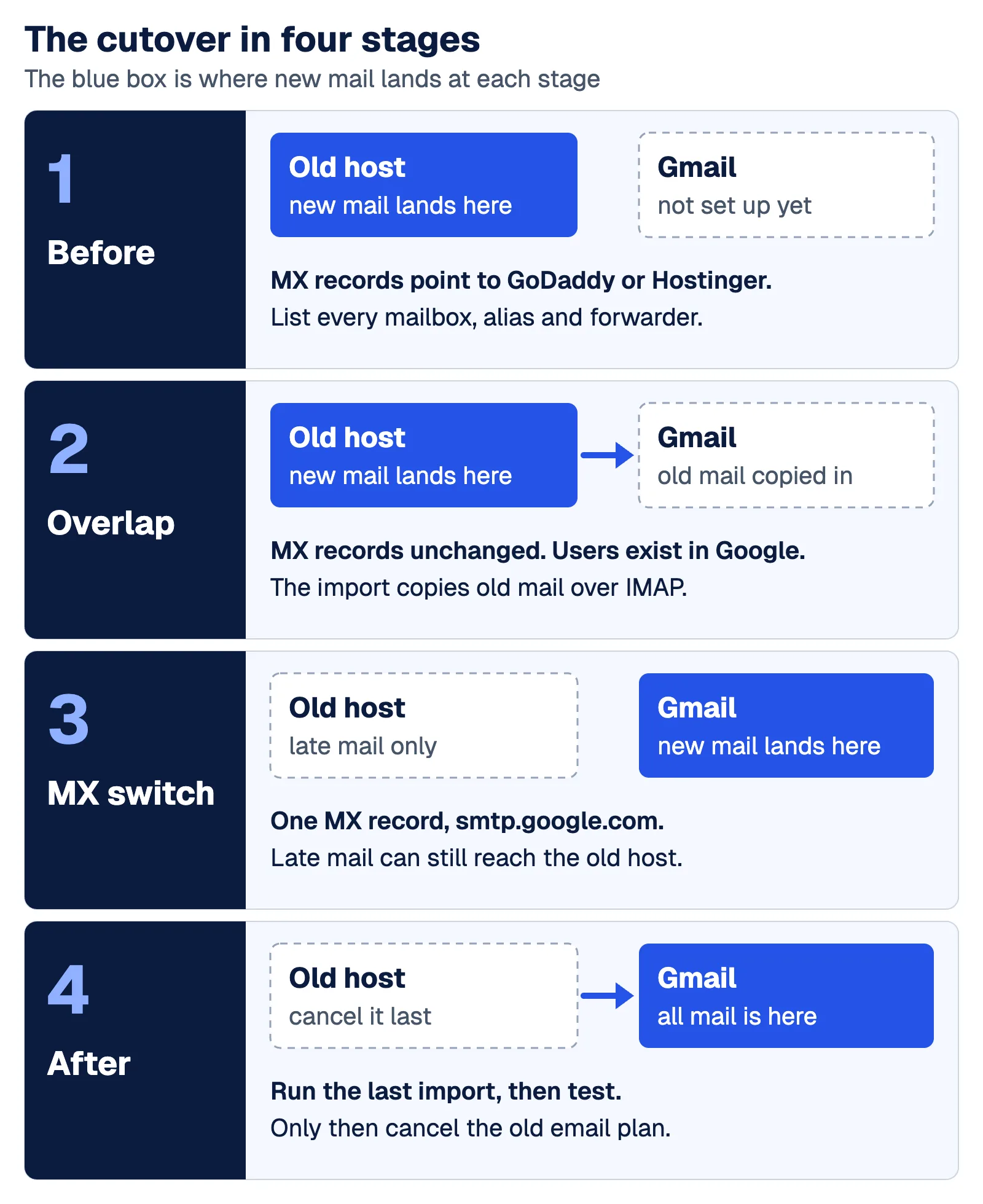
List every mailbox, alias and forwarder
Write down each mailbox, then the addresses that belong to nobody. GoDaddy sets forwarding per mailbox and offers aliases only on Pro Plus, Premium and Ultra. Hostinger keeps forwarders in both the dashboard and webmail and documents a catch all address.
Choose the plan and sign up without touching MX
Partner plans start at ₹270 per user per month for Starter and ₹1,080 for Standard on an annual commitment, with Enterprise priced individually. Google also lists Base at ₹99, an India only plan sold by Google directly on a self service basis rather than through a partner. These list prices exclude 18% GST, as our Google Workspace pricing in India page shows. The Google edition list for the data import tool names Business Starter and not Base.
Verify the domain
Add the TXT record that starts with google-site-verification at host @ where your DNS is managed. A TXT record does not change mail flow, and Google allows up to 72 hours for it to be recognised.
Create users and aliases
The import copies mail only into users that already exist, with a licence and Gmail turned on. Create one for every mailbox before the MX change, as the Google MX change checklist says, and add the aliases and groups from your list. Aliases stay free, up to 30 per user or group.
Import a pilot over IMAP
Google says resellers cannot run the import for customer accounts, so a super administrator of your own account runs it. You can do it yourself with the data import tool in the Admin console if you have a capable IT admin and a simple setup (one domain, under 50 users). Under Data import, enter the IMAP server from Table 1 with each old address, its password and the new Workspace address. Start with a few mailboxes, enough to prove the server name and passwords. Ask their owners to compare folders and sent mail in Gmail with the old mailbox.
Import everyone else
Exit the pilot first. Google requires that before a new import can start. Leave the pilot mailboxes out of the next run, because Google says a second import of the same content creates duplicates. Then keep this run open. Exiting it deletes the settings the last import needs.
Check the TTL a day ahead
TTL is how long other servers cache a DNS record. GoDaddy notes that shorter TTL settings may increase propagation speed. If you lower it on the old MX records, do it at least one full TTL before the switch.
Switch the MX records
The current Google Workspace MX record is a single record of type MX, with the host blank or @, priority 1 and the value smtp.google.com. Remove any other MX records, allow up to 72 hours, then activate Gmail in the Admin console.
Add SPF, then DKIM and DMARC
If only Google sends your mail, the SPF record is a TXT record at @ with the value v=spf1 include:_spf.google.com ~all. It replaces the old SPF record. DKIM can be generated in the Admin console only 24 to 72 hours after Gmail is turned on, and is added as a TXT record named google._domainkey. Gmail was turned on at step 4, so check for the key when you add SPF. DMARC is a third TXT record, named _dmarc, and Google recommends starting with the policy p=none.
Run the last import
After the wait, run a delta import in the run you kept open, which Google describes as importing data added to the IMAP account after the import. For the pilot mailboxes, our own advice is that the owners forward what arrived after the pilot. A forward shows a new sender and date.
Test
Send mail both ways with an outside address, submit your own website contact form and check each alias and shared address.
Cancel the old email plan
Cancel the email subscription once the last import has finished and people have found their old folders in Gmail. Do not delete the product or take a refund before then.
What Moves and What You Recreate by Hand
Google states that an IMAP migration moves email and label data only.
Table 2. What moves and how
| What you have | How it reaches Google Workspace | Watch out for |
|---|---|---|
| Mail and folders | Google data import tool over IMAP, up to 100 users per run, then a delta import after the MX change. Above 100 users, Google lists GWMME | An attachment is left out when the message with it is over 25 MB |
| Contacts | Each person imports a CSV or vCard file in Google Contacts | Neither help centre documents a webmail export |
| Calendars | Each person imports an ICS file in Google Calendar | CSV can break repeating events, so use ICS |
| Aliases and forwarders | Recreate them in the Admin console | No per mailbox import carries them |
| Signatures and filters | Each person sets them up again in Gmail | Not part of an IMAP import |
Neither host documents a calendar export either. Check before the switch whether your webmail or mail app can save these files. If it cannot, contacts and events are typed in again by hand. Our Google Workspace vs Zoho Workplace comparison shows the same limits for a Zoho move.
GoDaddy Email to Google Workspace, Records and Billing
GoDaddy has no help page with the Google values. It does publish its own records for Titan mailboxes. They are two MX records, smtp.secureserver.net and mailstore1.secureserver.net, and the SPF record v=spf1 include:secureserver.net -all. Remove all three at the switch. If a GoDaddy server still sends mail for your domain, Google prints a combined record, v=spf1 include:_spf.google.com include:secureserver.net ~all.
GoDaddy renews services automatically at its then current rates, and its India page prints only the first term price for Titan plans.
Website forms on GoDaddy cPanel hosting
GoDaddy tells customers on Web Hosting (cPanel) who use a different email provider that they may need to update email routing in cPanel. The cPanel documentation defines Local Mail Exchanger as always accepting mail for the domain and Remote Mail Exchanger as never accepting it.
Hostinger Email to Google Workspace, Records and Billing
Hostinger publishes a guide for Google Workspace records, and its DNS screen has a Quick setup option for Google Workspace (Gmail). The guide says to remove existing MX, SPF, DKIM and DMARC records that point to other email services. On a live domain that belongs at the switch and not before. Hostinger does not say which records Quick setup adds or removes, so read the list afterwards. The defaults, mx1.hostinger.com and mx2.hostinger.com, should be gone.
Hostinger says a domain must have only one SPF record, so merge any sender you keep into the Google record.
Every Hostinger service renews automatically by default, and its terms allow the charge from 30 days before the period ends. The mailboxes bundled with Hostinger India web hosting are free for 1 year, hold 1 GB each and then renew at ₹39 per mailbox per month on a 12 month term. Without a saved payment method or a manual upgrade the trial expires, and Hostinger says to export your emails first to prevent data loss.
How Long Mail Is at Risk During the MX Switch
No vendor publishes one figure, so plan on the longest.
| Who says it | The wait |
|---|---|
| Google, MX setup page | Up to 72 hours for new MX records to be recognised |
| Google, MX change checklist | Up to 48 hours to propagate. Until the new records are active, emails are directed to your previous email provider |
| GoDaddy | Most DNS updates take effect within an hour but could take up to 48 hours to update globally |
| Hostinger | Up to 24 hours, and in rare cases up to 72 hours |
During that window a message can land at either system. One at the old host waits there until the last import, which is why the old plan stays active. Our own advice is that everyone signs in to Gmail on switch day and opens the old webmail once a day until the last import has run. Phones and mail apps set to the old server show only the old mailbox. Google suggests making the change when email volume is low and telling key contacts the date and time and how to resend bounced messages.
Four Mistakes That Lose Mail
Ending the old plan too early
At both hosts, cancelling the subscription only stops the renewal. The mailboxes work until the end date. Deleting the product or a mailbox removes it now, and GoDaddy warns it might not be recoverable. A Hostinger refund stops the service at once. Finish the last import before any of the three.
Forgotten forwarders and catch all addresses
An address that only forwards, such as accounts@, has no mailbox, so no import will show it. Recreate each one in Google before the switch.
SPF that still names only the old host
Google says the SPF record must list every server that sends for the domain, including web servers and contact forms.
DKIM left off
Google requires SPF or DKIM on mail to personal Gmail accounts and says messages that are not authenticated might be marked as spam or rejected (sender guidelines). Add the DKIM record as soon as the Admin console offers the key.
Cutover Day Checklist
- Every mailbox, alias and group on your list exists in Google.
- The main import has finished and is still open.
- A copy of the current DNS records is saved.
- The old MX records are gone, one record points to
smtp.google.comand Gmail is activated. - The old SPF record is replaced, DKIM is added if the key is ready, and reminders are set for DMARC and the last import.
- The old email plan is not cancelled, deleted or refunded, and its end date falls after the last import.
Doing the Move with Unico Connect
Unico Connect is an official Google Workspace partner based in Mumbai. We sell Google Workspace at official Google list prices, bill in INR with GST, and set up and support it for companies across India. Migrations from Microsoft 365, Zoho, or another provider follow our SmoothSwitch process and take 1 to 8 weeks depending on company size, with mail flowing throughout.
Frequently Asked Questions
Can I keep my domain and website with GoDaddy or Hostinger and move only email?
Yes. The move changes only DNS records, so the domain registration and web hosting stay where they are. Edit the records where your nameservers point. That is the Domain Portfolio for a domain on GoDaddy nameservers, and the DNS / Nameservers page for a domain pointed to Hostinger.
What is the IMAP server for GoDaddy and Hostinger email?
GoDaddy gives imap.secureserver.net for Professional Email powered by Titan, and mail. followed by your domain for Web Hosting (cPanel) mailboxes. Hostinger gives imap.hostinger.com for Hostinger Email and imap.titan.email for Titan Email. All four use port 993.
Do I delete the GoDaddy or Hostinger MX records when I add the Google record?
Yes, at the switch and not before. Google says to remove any other MX records. At GoDaddy those are the two secureserver.net records for Titan mailboxes, and at Hostinger mx1.hostinger.com and mx2.hostinger.com.
When can I cancel GoDaddy or Hostinger email after the move?
Cancel once the last import has finished and people have checked their old mail in Gmail. Cancelling the subscription stops the renewal, and both hosts keep the mailboxes active until the end date. Do not delete the product or a mailbox, or ask Hostinger for a refund, while you still need the old mail.
Can I use the import that Google offers during Workspace setup?
Not for the main copy. On 23 September 2026 Google announced an import from any IMAP provider in the setup flow. It takes the past email of only one user and appears only after the domain is verified and email is activated, which for a live company means after the MX switch.