









MCP in Production, Building AI Agents with Model Context Protocol

Vasim Gujrati
Solutions Architect, AI & Platforms, Unico Connect
In this article
- What Is Model Context Protocol and Why Does It Matter for AI Agents?
- How MCP Changes AI Agent Architecture
- What We Actually Encounter When Deploying MCP in Enterprise Systems
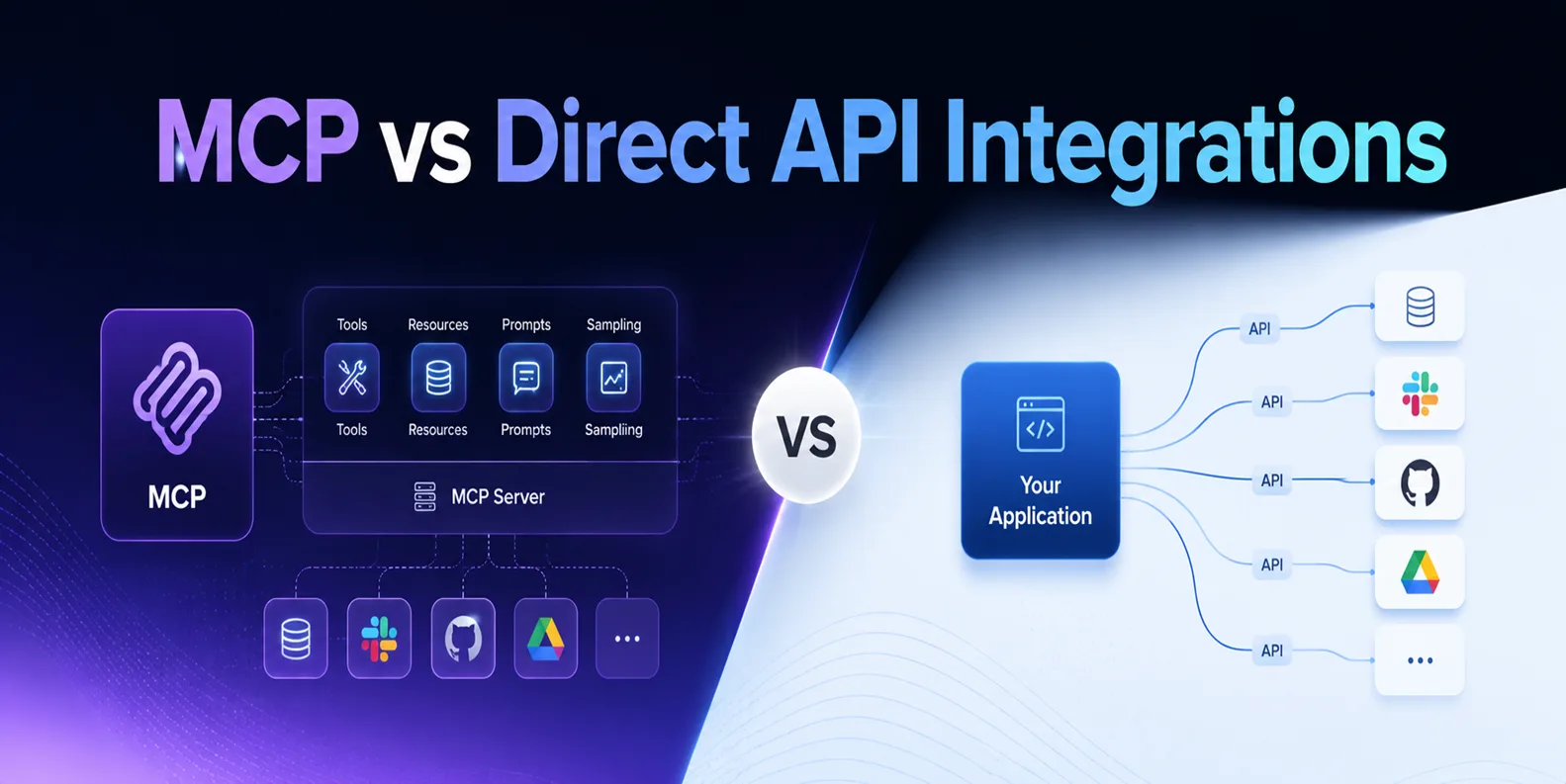
- MCP vs Direct API Integration: When to Use Each
- Compliance and Security Considerations for MCP in Enterprise
- What MCP Means for AI Development Cost and Timeline
- Frequently Asked Questions
What Is Model Context Protocol and Why Does It Matter for AI Agents?
Every new tool you give an AI agent means another round of custom integration work. Salesforce needs a connector, your internal CRM needs another one, and Slack needs a third. Each one is bespoke with its own authentication logic, and each breaks in its own way when an upstream API changes.
Model Context Protocol (MCP) is an open standard that Anthropic created for exactly this problem. Think of it as USB-C for AI tool integrations. Before USB-C, every device manufacturer shipped its own proprietary port. After USB-C, one standard worked across manufacturers and use cases. MCP does the same for AI agents. It gives an agent one standard way to discover external tools, data sources and services, call them, and read what comes back.
MCP has three core components.
MCP Hosts are the AI applications or agents that need external tools. A LangChain agent, a Claude-based assistant and a custom agent harness are all MCP hosts.
MCP Clients are the protocol libraries embedded in the host that manage connections to MCP servers.
MCP Servers are lightweight services that expose capabilities such as querying databases, calling REST APIs, searching documents or executing code.
When your agent needs information, it sends a standardised tool call request to the MCP server. The server runs the integration logic and returns a structured response, and the agent carries on. The agent does not need to understand the system behind the server. It only needs to know which tools are available and what parameters each one expects.
How MCP Changes AI Agent Architecture
Agent architecture before and after MCP differs substantially, most of all when you run several agents across an enterprise.
| Criteria | Before MCP (Custom Integrations) | After MCP (Standardised Protocol) |
|---|---|---|
| Setup time per tool | 1-3 weeks per integration | First MCP server adds 2-3 weeks, then integration time for later agents drops 30 to 50 percent |
| Code reusability | Nearly zero; each integration is bespoke | High; any agent can call registered servers |
| Maintenance burden | High; each API change breaks specific integrations | Centralised; fix once, all agents benefit |
| Security surface | Distributed; credentials scattered across codebases | Centralised; auth logic in MCP server layer |
| Context management | Manual; developers handle formatting case-by-case | Structured; typed, schema-validated responses |
| Agent portability | Low; agents depend on specific integration code | High; agents describe needs as tool calls |
The shift matters most once an organisation scales past a single agent. One agent on its own may not justify the overhead of MCP. Five agents that need overlapping access to the same systems make the case clear, because the MCP server layer turns into shared infrastructure instead of an expense each agent carries alone.
What We Actually Encounter When Deploying MCP in Enterprise Systems
The setup documentation is thorough, and the guides from Anthropic will walk you through a basic MCP server implementation in an afternoon. A real enterprise deployment runs into very different problems.
Challenge 1: Context Window Pressure from Enterprise Data Sources
Enterprise databases rarely return small, clean responses. Query a customer record through an MCP server connected to a CRM and you might get hundreds of fields, nested objects, historical records and metadata the agent has no use for. If that payload goes straight into the context window, the LLM burns through its context budget quickly and the useful signal gets buried in noise.
In our experience, the right pattern is a summarisation or filtering layer inside the MCP server itself. The server queries the upstream system, trims the response with field selection and business rules, and returns only what the agent needs. Trimming tool responses is one part of context engineering, which is about deciding what enters the model context at each step.
Challenge 2: Authentication Complexity in Enterprise Environments
Consumer MCP demos usually run on API keys. Enterprise deployments are far more complex. Your MCP servers have to integrate with the identity providers already in place, such as Microsoft Entra ID (formerly Azure AD) or Okta, or with on-premises identity management systems in regulated environments. They need role-based access control, so that an agent running in a customer-facing context cannot call an MCP tool that exposes sensitive internal financial data.
They also need audit logging. In regulated industries, every tool call the agent makes has to be logged with its inputs, its outputs and the identity context of the call, in a format your compliance team can review.
Challenge 3: Tool Schema Design Is Harder Than It Looks
The tool schema tells the agent what the MCP server exposes, namely what each tool does, which parameters it expects and what it returns. When a schema is vague or ambiguous, the LLM calls tools with the wrong parameters, misreads the results, or makes a chain of calls where one would do.
Expect to spend significant iteration time on tool schemas in an enterprise project. The practical lessons include being extremely specific about parameter types and constraints, putting concrete examples in the schema description for any parameter format that is not obvious, and designing each tool to do one thing well instead of combining several operations.
Real-World Example: Complex Multi-Tool Integration
Two WhatsApp agents we built for a logistics client show how this plays out. One is a voice agent that answers customer enquiries about package status, pickup windows and billing, and hands the conversation to a human with its context when needed. The other is a separate ordering agent that recognises repeat business customers, surfaces their typical order patterns and confirms each order in conversation before pushing it through the platform.
Both agents read live order and operations data from the client platform, so every answer reflects the current state. The result was a lower cost to serve on routine enquiries, with business orders captured in the channel customers already use.
MCP vs Direct API Integration: When to Use Each
MCP is not the right call for every integration. The choice depends on how reusable the integration needs to be and how many agents will use it.
| Scenario | Use MCP | Use Direct API Integration |
|---|---|---|
| Multi-tool agent (3+ tools) | Yes | No |
| Single-tool agent | Borderline | Yes |
| Reusable across multiple agents | Yes | No |
| Prototype or PoC | No | Yes |
| Enterprise with existing tooling | Yes | Depends |
Compliance and Security Considerations for MCP in Enterprise
Compliance requirements vary by region and industry. If proper instrumentation is built in from the start, the centralised architecture of MCP makes compliance easier to manage than distributed custom integrations.
EU AI Act (Germany and broader EU). High-risk AI systems under the EU AI Act must technically allow automatic recording of events (logs) over the lifetime of the system. Structured MCP tool call logging, implemented properly, can serve as the evidence layer for that record keeping duty.
SOC 2 (US FinTech and SaaS). A SOC 2 Type II audit requires you to show that the systems accessing customer data have appropriate access controls and logging.
MAS TRM Guidelines (Singapore). The Technology Risk Management guidelines from the Monetary Authority of Singapore cover the IT systems of financial institutions in general, AI agents included, and expect regular testing of system resilience and of disaster recovery plans.
For a shipped example of an MCP first workflow, see how we build Xano backends with Claude Code and the Xano Developer MCP.
What MCP Means for AI Development Cost and Timeline
"In our experience, the first MCP implementation is the expensive one," says Malay Parekh, CEO of Unico Connect. "You are not just building an integration; you are building shared infrastructure."
On a project plan, the cost lands up front and the savings arrive later.
The first MCP server implementation adds roughly two to three weeks to the project timeline compared with a direct API integration.
For later agents on the same MCP server, integration time drops 30 to 50 percent in our experience.
Maintenance also gets cheaper. When an upstream API changes, you fix it once in the MCP server, whereas without MCP each agent calling that API needs its own fix.
Frequently Asked Questions
What is MCP in simple terms?
MCP, or Model Context Protocol, is a standard way for AI agents to connect to external tools and data sources. It gives agents and tools one shared language, so no agent needs custom code for every tool it talks to.
Is MCP only for Claude?
No. Anthropic created MCP, but it is an open standard that any AI agent framework can implement, and many already have. LangChain, for example, supports MCP directly and can load tools from MCP servers. In December 2025, Anthropic donated MCP to the Agentic AI Foundation, a directed fund under the Linux Foundation, so a neutral foundation now holds the standard.
How long does it take to implement MCP for an enterprise project?
The first MCP server implementation typically adds two to three weeks to a project. Agents that later use an existing MCP server integrate much faster, in our experience 30 to 50 percent faster than the initial build.
What are the security risks of MCP in production?
The main risks are misconfigured access controls, insufficient audit logging and flawed schema design. Careful MCP server design can address all three.
Do I need MCP for a simple chatbot?
No. If your chatbot does not need to call external tools or query live data, MCP only adds complexity.
How does MCP affect maintenance costs over time?
MCP lowers maintenance costs in multi-agent environments, because you fix an upstream integration once in the MCP server instead of in every agent that uses it. Our AI agent development team builds production MCP setups.