









Low-Code and No-Code, the Future of Software Development

Vasim Gujrati
Solutions Architect, AI & Platforms, Unico Connect
In this article
Low-code and no-code platforms have reshaped how software gets built. They've moved from experimental side-tools to credible production stacks — used by startups for MVPs, by enterprises for internal tools, and by product teams for backend services that would once have required a full engineering team. This guide explains the differences, the strengths and limits of each, and where tools like Xano fit into the picture for efficient web development.
Quick Answer
Low-code platforms reduce the amount of code engineers write but still expect technical users. No-code platforms remove code entirely — non-engineers can build full applications visually. Both accelerate delivery, lower cost, and free engineering teams to focus on differentiated work. Tools like Xano (no-code backend) and FlutterFlow (no-code mobile) now produce production-grade applications used by serious businesses. The right choice depends on team skills, customisation needs, and long-term scalability.
Key Takeaways
- Low-code keeps engineers in the loop but speeds up delivery by 40–60%
- No-code removes the engineering dependency entirely for many use cases
- Both share the same goals — faster delivery, lower cost, fewer coding errors
- Production-grade no-code tools (Xano, FlutterFlow, Bubble) now power real businesses
- The future is hybrid — engineers and citizen developers building together
Key Features of Low-Code Platforms
Low-code platforms give developers a visual builder backed by an escape hatch into code. The visual layer handles common patterns; custom code handles the differentiated logic.
- Customer-facing applications — portals, dashboards, and storefronts shipped without rebuilding common UI patterns
- Process automation — workflow automation across departments, reducing manual operational cost
- Business process modelling — define and orchestrate multi-step flows visually
- UI, data, and logic in one platform — design the model, the screens, and the rules together
- AI-augmented workflows — embed AI and ML capabilities into apps without bespoke ML infrastructure
For engineering teams, low-code is a productivity multiplier — not a replacement.
What Is No-Code Development?
No-code platforms let non-engineers build full applications through visual modelling and configuration. The work that previously required hiring a developer now sits within reach of product managers, operations leads, and founders. Citizen developers become a real category — building tools their teams need without bottlenecking on engineering.
That accessibility has unlocked a wave of internal tools, MVPs, and operational apps that would otherwise never have been built. Engineering capacity is precious; no-code redirects the easy 60% of internal tool work away from engineering and toward the people closest to the problem.
Key Features of No-Code Platforms
- Visual modelling tools — design data, screens, and logic without writing code
- Out-of-the-box functionality — common modules (auth, CRUD, payments) ready to use
- Drag-and-drop interfaces — assemble apps the way you'd assemble a slide deck
- Reusable modules — build once, reuse across products
- Cross-platform output — apps work across web and mobile from a single source
- Built-in scalability — hosting, scaling, and updates handled by the platform
- Lifecycle management — testing, debugging, and deployment integrated into the platform
The strongest no-code platforms now compete with custom development on quality — not just speed.
How Low-Code and No-Code Differ
Three differences usually matter most:
- Coding skills required — no-code is accessible to any business user; low-code expects technical knowledge
- Architectural control — low-code allows deeper customisation through code; no-code constrains you to platform capabilities
- UI flexibility — no-code ships preset UI patterns; low-code lets you customise the interface layer more deeply
Choosing between them isn't just about who builds the app — it's about how much control you need over the final product.
Where Xano Fits for Efficient Web Development
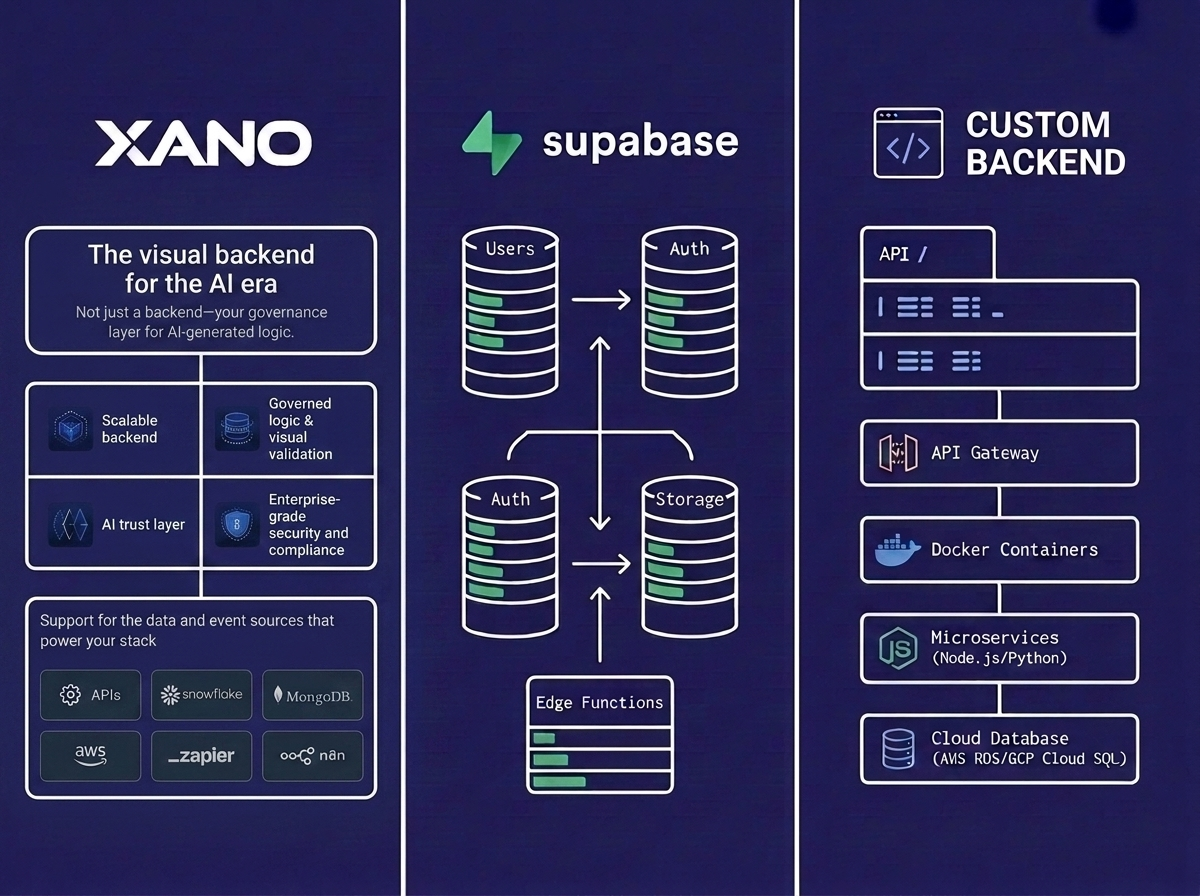
Xano is a no-code backend platform that has become a go-to choice for product teams building serious web applications without a backend engineering team. It provides:
- Visual database builder — design schemas without writing migrations
- Visual API builder — REST endpoints without writing controllers
- Built-in authentication — JWT, OAuth, and role-based access control
- Background tasks and triggers — scheduled jobs and event-driven workflows
- External API integrations — connect to Stripe, Twilio, and any REST service
- Production-grade scaling — hosted on enterprise infrastructure with horizontal scaling
For teams pairing Webflow or FlutterFlow on the frontend with Xano on the backend, the result is a full-stack no-code product that ships in weeks instead of months. Unico Connect's no-code development services cover this exact stack for startups and growing product teams.
What Low-Code and No-Code Share
Despite the differences, both share the same operational goals:
- Faster delivery — visual development is 3–5x faster than writing equivalent code
- Lower cost — smaller teams, fewer specialists, lower engineering spend
- Fewer coding errors — visual constructs catch many classes of bugs before they ship
- More agility — non-engineers can iterate on the product without waiting for an engineering sprint
The combination of low-code and no-code now covers most of the software needs of a typical mid-market business — leaving custom development to focus on what's genuinely differentiated.
Try Xano yourself: Xano is the production-grade no-code backend we build on. Start building on Xano, or hire a Xano developer to ship it for you.
Frequently Asked Questions
What's the main difference between low-code and no-code?
Low-code reduces but doesn't eliminate coding — engineers still write some code for customisation. No-code removes coding entirely; non-engineers can build apps end-to-end. The right choice depends on team composition and how much customisation the app needs.
Are no-code apps production-ready?
For many use cases, yes. Modern no-code platforms (Xano, FlutterFlow, Bubble, Glide) produce apps that handle real users and real traffic. They're not the right fit for everything — performance-critical apps and deeply specialised products still need custom development — but the production-readiness threshold has moved up dramatically in the last three years.
Can no-code apps scale to enterprise users?
Many platforms now handle hundreds of thousands of users cleanly. Very large enterprise apps (millions of users, strict SLAs, deep customisation) typically still require custom development, but the gap is shrinking each year.
Is Xano a good choice for production backends?
Yes, for many use cases. Xano produces production-grade REST APIs with auth, scaling, and integrations built in. It's particularly strong for SaaS, marketplace, and internal tool backends — saving teams from rebuilding backend plumbing every time.
Will low-code and no-code replace developers?
No — they redistribute developer work. Engineers focus on differentiated, high-value work; citizen developers handle the long tail of internal tools and standard apps that previously bottlenecked on engineering. The total amount of software being built has increased, not decreased.
How do I decide between low-code and no-code?
If your team is technical and the app needs deep customisation, choose low-code. If your team is non-technical and the use case fits standard patterns, choose no-code. Most organisations now run both — no-code for citizen-developed internal tools, low-code or custom for differentiated products.
Conclusion
Low-code and no-code platforms are no longer a niche — they're how a meaningful share of new software gets built. Tools like Xano have made no-code backends production-ready; FlutterFlow has done the same for mobile. The strongest teams use these platforms strategically — accelerating delivery without giving up the option to extend into custom code when it counts. To explore how Unico Connect builds production-grade apps on Xano, FlutterFlow, and Webflow, see our Enterprise Partner Xano backend and no-code development services.